
Field manual · 15/17
Apple Watch
The watch companion puts four things on your wrist: your grid, the bearing and distance to the target the phone is navigating to, a one-button mark, and start/stop for a track recording. It installs with the iPhone app — there is nothing separate to buy.
installing and pairing
The watch app ships inside the iPhone app. Install Tactical GPS on the iPhone and the watch app appears on the paired Apple Watch automatically, or install it by hand from the Watch app on the iPhone under Available Apps. It needs watchOS 10 or later.
Page between the four screens by swiping horizontally. Everything the watch shows follows the phone's settings — coordinate format, distance and altitude units, angle format, north reference and night vision all come across; there is nothing to configure on the wrist.
position
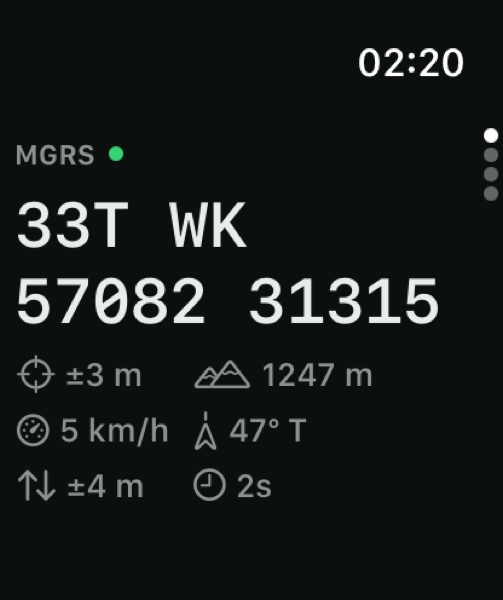
Your grid reference, large, in whatever format the phone is set to — MGRS, UTM, a national grid or lat/lon. Underneath it sits a row of readouts:
- Format
- Which format the grid above is written in
- ± horizontal
- Accuracy of the current fix
- ± vertical
- Altitude accuracy, when the fix reports one
- Altitude
- In your chosen altitude unit
- Age
- How old the fix is —
8s,3m,2h

Stale fixes are visible, not hidden
The age readout never shows zero and never goes blank. A fix that has stopped updating keeps counting up, so a watch that has quietly lost GPS looks different from one that is tracking. Before a first fix the grid reads —— ——.

Always On
On an Always-On display the screen keeps the grid legible at wrist-down instead of blanking it, so a glance still gives you a position.
nav
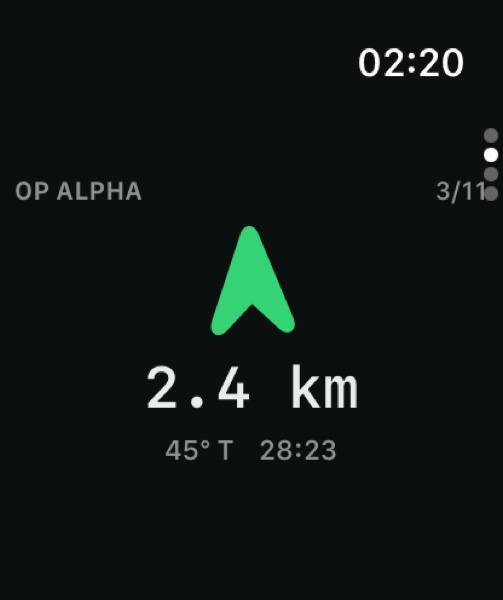
A bearing arrow pointing at the waypoint the phone has active, with the distance under it, the bearing in your north reference and an ETA when you are moving. When a route is running, the waypoint counter shows your place in it.

Arrival haptic
The watch taps your wrist when you reach the waypoint. It uses the phone's own arrival test, so the haptic fires at exactly the moment the phone considers the point reached — the two can never disagree. The haptic is armed once per waypoint and re-arms when the phone moves you to the next one.

The phone stays in charge
The watch never advances a route by itself. It mirrors the phone's current target and reports arrival; stepping, auto-advance and off-route logic all stay on the phone.
mark
One button. Press it and your current position becomes a pin in the active layer — the fastest way to record something without taking the phone out.

Marks queue when the phone is away
If the phone is out of range the mark is not lost. It goes into a stored outbox and is delivered when the two reconnect — carrying the time you pressed the button, not the time it was delivered, so the pin lands with the right timestamp.
| Button reads | Meaning |
|---|---|
| MARK | Ready. Press to drop a pin at your position. |
| NO FIX | No usable GPS fix yet — there is no position to save. |
| PIN LIMIT | The free tier's pin cap is reached in the active layer. |
| UNLOCK ON IPHONE | The phone is locked, so the pin cannot be written yet. |
track
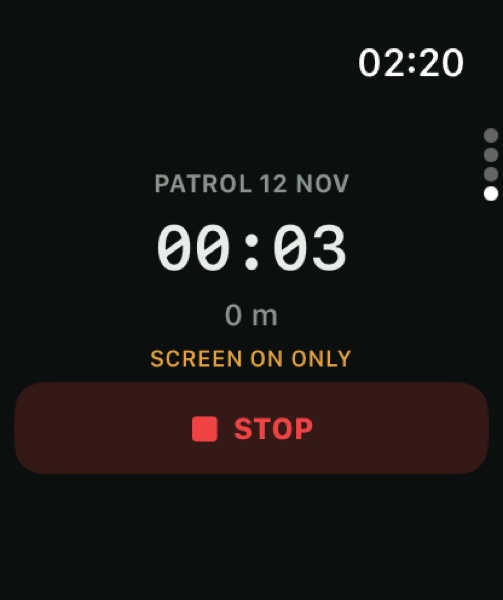
Start and stop a track recording from the wrist, with live distance and elapsed time. The recording is the phone's — the watch is a remote control and a readout, so the resulting session is the same one you would have got by pressing start on the phone.
| Screen reads | Meaning |
|---|---|
| RECORD | Ready to start. |
| PAUSED | The session is paused, on either device. |
| PRO REQUIRED | Track recording is a Pro feature. |
| UNLOCK ON IPHONE | The phone is locked and cannot start the session. |
| SCREEN ON ONLY | The watch could not hold a background session — see below. |