Field manual · 06/12
Tracker
The Tracker records where you've been — for after-action review, for proof of coverage, and for finding your way back.
recording

Start a session
Open the Tracker tab and start recording. The red indicator in the map controls blinks while a session is live; tap it any time to see the current session.

Stop & save
Stop from the Tracker tab or the live session view. Sessions are kept in the session history.
reviewing sessions
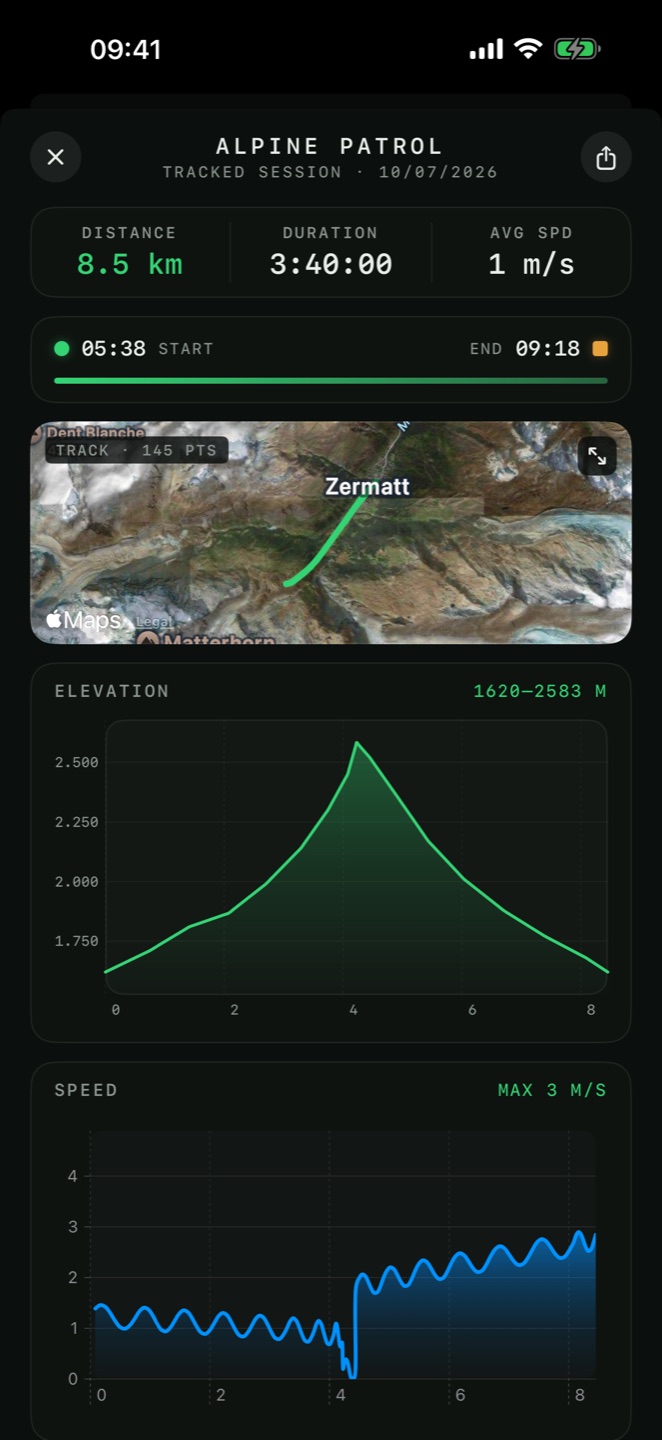
Session detail
Each session shows the track on the map plus distance, duration, and full elevation and speed profiles.

Track appearance
Settings → Tracker controls whether the live track is drawn on the map, its color and width.
backtrack
From any recorded session, Backtrack navigates you back along the exact path — with the compass or on the map. Record on the way in; walk out the same way in fog, darkness or featureless terrain.